

How to Program a Thermostat for Each Season
Your thermostat can save you money and keep your home comfortable year-round with the right settings. Adjusting it seasonally can cut heating and cooling costs by up to 10% annually, according to the U.S. Department of Energy. Here's a quick guide:
- Summer: Set to 78°F when home, 85°F–88°F when away, and 72°F–75°F at night for sleep.
- Winter: Keep it at 68°F when home, 58°F–60°F when away, and 60°F–67°F for sleeping. Avoid going below 55°F to prevent frozen pipes.
- Spring/Fall: Use "Auto" mode with a range of 68°F–78°F for fluctuating temperatures.
- Vacations: Set to 50°F–65°F in winter and 80°F–85°F in summer to save energy while protecting your home.
Placement Tips: Install your thermostat on an interior wall, away from windows, doors, vents, or heat sources to ensure accurate readings.
Maintenance: Replace batteries, check settings, and test heating and cooling modes regularly. Smart thermostats can simplify programming and even adjust settings remotely.
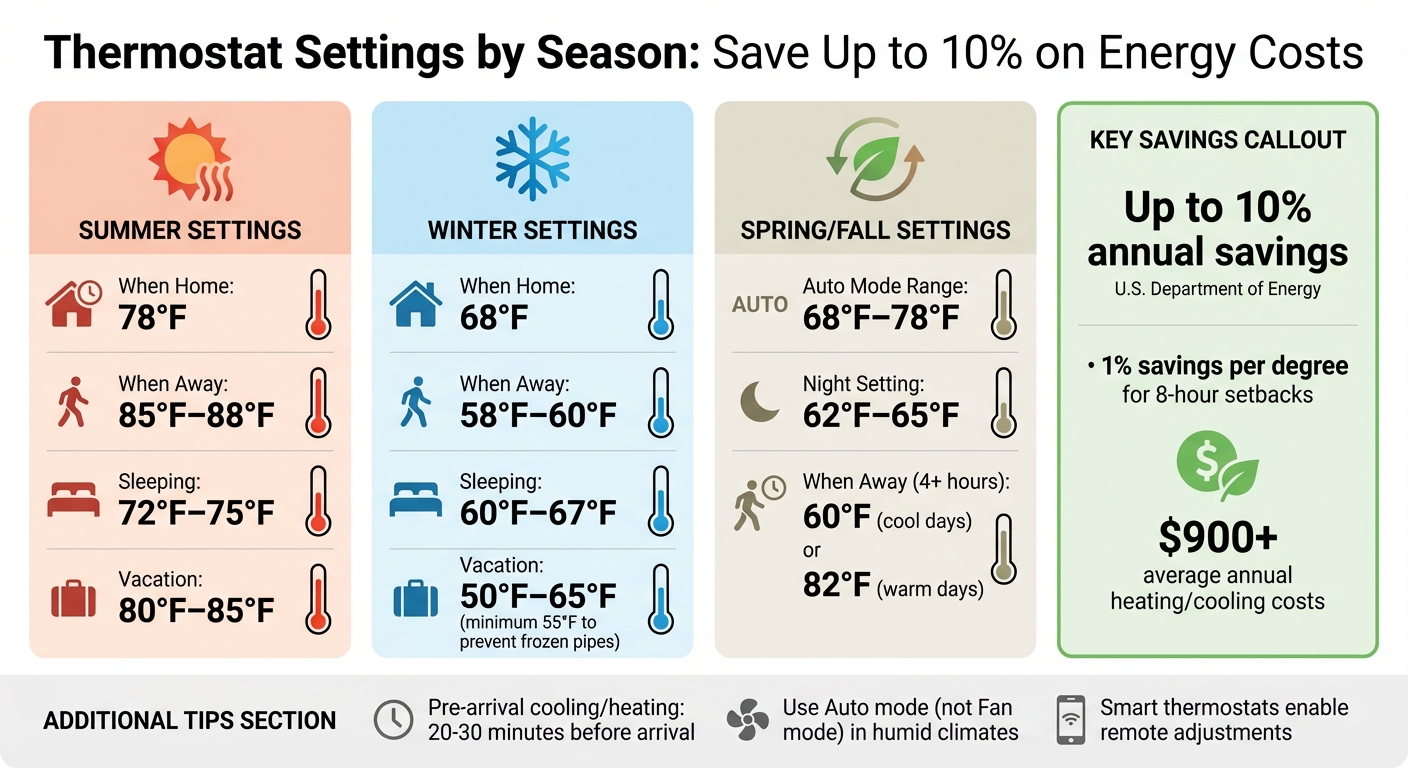
Seasonal Thermostat Temperature Settings Guide for Year-Round Energy Savings
How to Program and Set a Schedule on Your Thermostat
sbb-itb-ab7d5a1
Getting Your Thermostat Ready for Seasonal Programming
Before diving into programming, make sure your thermostat is in the right spot and working properly. Even the best settings won't save energy if your thermostat is poorly placed or outdated.
Where to Place Your Thermostat
For accurate readings, your thermostat should measure the average temperature of your home - not just one overly warm or chilly spot. The best location? An interior wall in a room you use often. This helps it provide a more reliable gauge of your home's overall temperature.
Avoid placing it near windows, skylights, doorways, or heat sources like ovens or radiators. These areas can cause inaccurate "ghost readings" - false temperature signals that trick your system into turning on when it’s not necessary. Drafty windows or vents can have the same effect, making your thermostat think the room is hotter or colder than it actually is.
Also, make sure the area around your thermostat is clear. Furniture, shelves, or decorations blocking airflow can interfere with its ability to sense the room’s temperature correctly. And don't forget: it should be easy to access for any manual tweaks.
Testing Your Thermostat's Performance
Start by checking the basics: is the display showing the correct date, time, and day? Research shows that 20% of thermostats are set to the wrong time, which throws off programmed schedules. If you see a "Hold" message, turn it off so your programmed settings can take over.
Next, replace the backup batteries to ensure your settings are saved during power outages. Then, test your system by cycling through Heat, Cool, and Auto modes to make sure your HVAC responds properly. You should hear a click and feel the system start running. Before testing, swap out your air filter and confirm all vents in your home are open and unobstructed. A clogged filter or blocked vent can stop your system from reaching the temperatures you’ve set.
"Programming your thermostat can feel daunting. But with a little preparation and some understanding of what lies ahead, the task can be made easier." - John Galeotafiore, Testing Overseer, Consumer Reports
Once your thermostat is set up and working smoothly, you're ready to program it for the changing seasons.
How to Program Your Thermostat for Summer
When summer heat hits, especially in places like Florida, your air conditioning system works overtime. Programming your thermostat correctly can help you stay cool while keeping energy costs in check. Did you know the average U.S. household spends more than $900 annually on heating and cooling? A big chunk of that goes toward summer cooling costs.
Best Temperature Settings for Summer
For the perfect mix of comfort and energy efficiency, the U.S. Department of Energy suggests setting your thermostat to 78°F when you're home and active. Heading out for work or errands? Bump it up to 85°F–88°F. This way, your AC won’t waste energy cooling an empty house.
At night, aim for 72°F–75°F for a restful sleep, or go for 80°F–82°F if you’re using ceiling fans and lightweight bedding. Got pets at home? Keep the "away" temperature no higher than 82°F for dogs or 85°F for birds and small mammals to ensure their comfort.
One myth to avoid: cranking your thermostat below 70°F won’t cool your home faster. Your AC works at the same rate regardless of the setting, and going too low can make it run longer, nearly doubling your energy bill. Instead, use ceiling fans to circulate air. A ceiling fan on medium speed uses 100 times less energy than a central AC unit, and it allows you to raise the thermostat by about 4°F without sacrificing comfort.
Setting Pre-Arrival Cooling Times
To ensure your home is cool when you return, program your thermostat to start cooling 20–30 minutes before you arrive. This way, the temperature hits a comfortable 78°F just as you walk in the door, without wasting energy throughout the day. If you have a smart thermostat, you can even use its mobile app to manually switch to "Home" mode if your plans change and you’re heading back earlier than expected.
"During the summer, aim for a thermostat setting of around 78°F when you're not at home. If you have a programmable thermostat, set the temperature lower to a comfortable level before heading home." - Brad Roberson, President, Aire Serv
For Florida’s humid climate, always set your thermostat to "Auto" mode rather than "Fan" mode. Using the "Fan" setting can circulate damp air, making your home feel warmer and less comfortable. The "Auto" mode ensures the AC only runs when cooling is needed, which also helps remove moisture from the air.
How to Program Your Thermostat for Winter
Setting up your thermostat correctly can keep your home cozy while helping you save on heating costs. According to the U.S. Department of Energy, keeping your thermostat at 68°F when you're home and awake is ideal for balancing comfort and energy use. Dropping the temperature by 7°F–10°F for about eight hours a day could reduce your annual heating bill by as much as 10%, with an estimated 1% savings per degree.
If your home uses a heat pump, avoid frequent temperature setbacks - this can activate the backup electric resistance heat, which is less efficient.
Best Temperature Settings for Winter
For a good night's sleep, set your thermostat between 60°F and 67°F. This range supports your body's natural sleep cycle and promotes better rest. When you’re away during the day, lower the temperature to 58°F–60°F to reduce heat loss while still protecting your home.
Planning a vacation? Set your thermostat to no lower than 55°F to avoid frozen pipes or damage to your home. If your household includes infants, elderly individuals, or anyone with health concerns, it’s safer to keep the temperature at a minimum of 68°F. Additionally, the World Health Organization advises that indoor temperatures should stay above 64°F when people are home and awake during winter.
Setting Pre-Wake Heating Times
To make sure your home is warm when you wake up or return, program your thermostat to reach 68°F about 20–30 minutes before these times. If you rely on radiant heating systems, start even earlier - around 2–3 hours in advance.
"Understanding how to program your thermostat for different times of the day or week allows you to create heating and cooling schedules that align with your daily routine, ensuring comfort when needed and energy savings when not." - Brad Roberson, President of Aire Serv
How to Program Your Thermostat for Spring and Fall
Once you’ve got your summer and winter thermostat settings dialed in, it’s time to tackle the transitional seasons. Spring and fall bring unpredictable weather - think chilly mornings and balmy afternoons. To keep things comfortable without constant tinkering, use your thermostat’s Auto mode (sometimes labeled "Heat/Cool" mode). This setting allows your system to seamlessly switch between heating and cooling based on the temperature range you set.
Setting Up Auto Mode with Temperature Ranges
In Auto mode, you’ll need to set both a high and low temperature threshold. For most homes, a range of 68°F to 78°F strikes a good balance during these in-between months. This range ensures your system only kicks on when necessary, avoiding energy waste while keeping your home comfortable. It also works in harmony with your summer and winter settings, creating a smooth transition as the seasons shift.
"Spring and fall can be finicky seasons... Setting a preferred high and low temperature would be best in cases like these, ranging from 68 to 78 degrees during the day." - Bob's Heating & Air Conditioning
If you’re using a heat pump, avoid making drastic temperature adjustments when heating. Heat pumps are less efficient when recovering from steep temperature drops, so stick to consistent settings around 68°F to maximize efficiency.
Now, let’s fine-tune your thermostat to handle the ups and downs of transitional weather.
Adjusting Settings for Mild Weather
During spring and fall, nighttime temperatures often dip significantly. For better sleep and energy savings, program your thermostat to 62°F–65°F at night. On warmer nights, you might prefer a setting closer to 72°F–75°F - adjust based on what feels right for the current weather.
When you’re away for extended periods (four hours or more), aim for efficiency. Set your thermostat to 60°F on cooler fall days or up to 82°F on warmer spring afternoons. This 7°F–10°F temperature setback helps save energy without sacrificing comfort. If you have a smart thermostat with geo-fencing, it can automatically adjust settings when it detects you’ve left or returned home, making things even easier.
Programming for Vacations and Extended Absences
When you're heading out for a vacation or an extended trip, adjusting your thermostat can help save energy while still protecting your home from extreme temperatures. Here's how to optimize your thermostat settings for both winter and summer.
Using Vacation Mode in Different Seasons
In the winter, set your thermostat between 50°F and 65°F to prevent frozen pipes while minimizing energy use. Temperatures below 50°F can increase the risk of pipes freezing, especially during extreme cold. If you've had issues with frozen pipes in the past, opening cabinet doors under sinks can help warm air circulate and reduce the risk.
"Industry experts say you can set your thermostat between 50 and 65 degrees when you're away in winter. But don't go lower than 50 degrees Fahrenheit, or you run the risk of pipes freezing in extreme cold." - Anne Fonda, Content Writer, Trane
In the summer, aim for a range of 80°F to 85°F to cut cooling costs and maintain humidity control. Setting the thermostat above 85°F isn’t recommended since your air conditioner needs to run occasionally to dehumidify the air. If you're leaving pets at home, adjust the settings for their comfort - try 60°F–65°F in winter and 75°F–80°F in summer to keep them safe.
Smart thermostats make it easier to fine-tune these settings for your specific needs.
Creating Custom Away Schedules
Smart thermostats take the hassle out of vacation planning. Instead of using the basic "Hold" function, which locks in a single temperature, Vacation Mode allows you to set a return date. This way, your home can automatically return to your preferred temperature schedule before you arrive. For winter trips, consider programming the thermostat to start warming or cooling your home about 12 hours before your return.
Forgot to activate Vacation Mode before leaving? No problem. Many Wi-Fi–enabled thermostats let you adjust settings remotely via your smartphone. These devices can also send alerts if the temperature drops to unsafe levels or if there’s a power outage, keeping you informed and helping to protect your home while you're away.
Conclusion
A carefully programmed thermostat isn’t just about convenience - it’s a smart way to save money and extend the life of your HVAC system. By adjusting your thermostat settings for each season, you can cut energy costs significantly while keeping your home comfortable.
Seasonal programming also helps reduce strain on your HVAC system, preventing unnecessary wear and tear. For example, setting your thermostat to 68°F during winter and 78°F in summer, with adjustments for when you're away or asleep, keeps your system running efficiently.
"Setting your thermostat at the right temperature can maintain comfort, lower energy bills, and extend the life of your HVAC system." - Brad Roberson, President, Aire Serv
Don’t forget the importance of regular maintenance to complement these settings. Schedule professional HVAC tune-ups twice a year - once in spring and again in fall - to ensure everything is running smoothly. In between those visits, simple tasks like replacing air filters and keeping vents unobstructed can go a long way in maintaining proper airflow and efficiency.
Whether you’re using a basic programmable thermostat or a high-tech smart model, the principles remain the same. With the tips outlined here and support from HVAC experts like West Florida Air Conditioning & Heating Inc., you can take charge of your thermostat settings and enjoy the rewards: lower bills, better comfort, and a longer-lasting system.
FAQs
What are the best thermostat settings to keep pets comfortable while I’m away?
When you're not home, keeping your pets comfortable without wasting energy is key. Most dogs and cats do well in a temperature range of 65°F to 75°F. In warmer months, aim for the higher end (around 75°F) to prevent overheating. During colder weather, keep it closer to 68°F to ensure they stay cozy.
If you have a programmable or smart thermostat, take advantage of its "away" settings to maintain this pet-friendly range while you're out. Smart thermostats are especially convenient because you can adjust the temperature remotely if unexpected weather changes pop up.
Before heading out, make sure your pets have plenty of fresh water. Close curtains or blinds to block out excess heat from sunlight, and consider any special requirements, like a heated pad for older pets. If you're unsure how to program your thermostat or are thinking about upgrading to a smart model, West Florida Air Conditioning & Heating Inc. can help you create a comfortable environment for your furry friends all year long.
Why is my thermostat showing the wrong temperature, and how can I fix it?
If your thermostat isn’t showing accurate temperature readings, several factors could be at play, including its placement, calibration, or sensor issues. Start by checking where it’s installed. Ideally, it should be on an interior wall, away from things like direct sunlight, drafts, or heat-emitting appliances, as these can throw off its accuracy. Also, make sure nothing is blocking airflow around it, such as furniture or curtains.
To test its accuracy, place a reliable indoor thermometer near the thermostat and compare the readings. If there’s a clear discrepancy, you can try adjusting the thermostat’s temperature offset settings - your manual should guide you through this. A full reset might also help. Additionally, gently clean the sensor with a soft brush or use compressed air to clear out any dust that may have accumulated.
If none of these steps fix the issue, the problem could stem from a faulty sensor or wiring. In that case, it’s best to call a professional HVAC service, like West Florida Air Conditioning & Heating Inc., to diagnose and resolve the problem. Accurate temperature readings are crucial for maintaining both your home’s comfort and your system’s efficiency.
How can I program my smart thermostat to save energy while on vacation?
To cut down on energy use during your vacation, adjust your smart thermostat to an "away" temperature that saves energy while still protecting your home. In the winter, drop the temperature by 5–10°F below your usual setting - around 60°F if you typically keep it at 68–70°F. For summer trips, increase the temperature by about 5°F, setting it to 78°F or higher.
If your thermostat has a dedicated vacation or away mode, take advantage of it to keep these energy-saving settings active while you're gone. Many smart thermostats also come with apps, enabling you to check and tweak the temperature remotely if needed. For a cozy return, program the thermostat to switch back to your regular settings about 20–30 minutes before you get home. These simple tweaks can help you save energy and ensure your HVAC system stays efficient while you're away.